2021 // University // Design and Computer Science
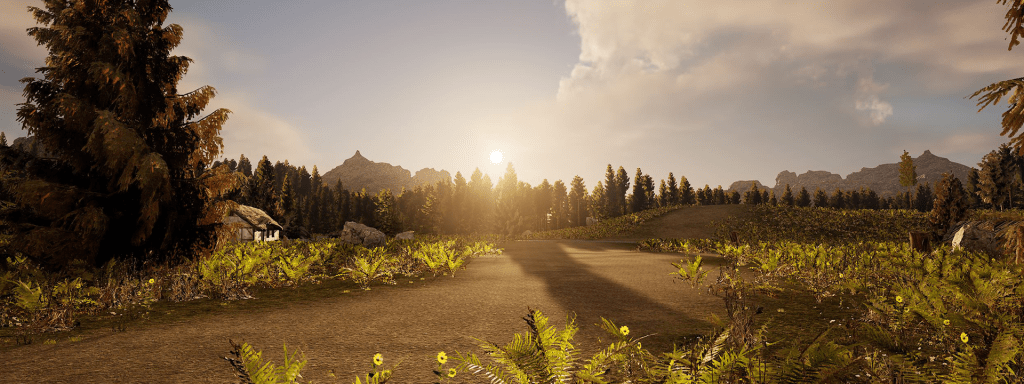
Woodland walk is an immersive and explorable nature space designed in Unreal Engine. It was my first time using Unreal Engine; I learned environment design and created this project in three and a half weeks. You can explore a small curated clearing found within a forest. The final product was inspired by Bob Ross videos, and a question of, “Wouldn’t it be fun to walk around the world you painted?”.
– Objective –
Imagine and create a short 360 immersive video experience. The challenge is to immerse your viewer into a 3D environment that takes them out of the real dimension and transports them into a world of your creation. Provide the viewer with a visceral experience that sparks an emotional response. Create a linear narrative form or a loopable short experience.
– Approach –
I had planned for and pitched a 360 video in Cinema4D, that featured a nature space slowly revealing a cybernetic representation of the nature scene using primitive objects and vibrant neon colors.
But after I submitted my pitch, I saw this video which was made using Unreal Engine, and overheard my professor talking to someone about using something other than Cinema4D. I asked shortly thereafter if I could pivot to using Unreal Engine and make something similar to a game, because what’s more immersive than allowing the audience to control where the camera goes?
With this pivot, I started looking for some crash courses that would allow me to learn some environment design and get a general understanding for working in Unreal Engine. I found this great creator on YouTube named UnrealSensei and watched a handful of his videos in order to learn how to use the material editor, landscape brushes, and paint in foliage. In addition to that, I wanted to make sure that the player controller was as immersive as possible, so that meant I needed to update the listener and footstep sounds depending on what material the character was walking on (as it would feel weird if walking through water had a dry grass crunch sound associated with it). I decided to forgo remaking the pitch, but made sure to communicate the pivot with my professor and stick with the idea of “walking through a Bob Ross painting”.
– Work Completed –
As I mentioned above, I created a project brief/pitch for the original C4D project, but I quickly pivoted. I had originally intended on keeping the digitized side of the forest for the Unreal project, but that was scrapped as I wanted to fully commit to the Bob Ross angle.
Since I had prior experience working in Unity, a lot of the organization and tools within Unreal Engine came very naturally to me. I usually am a quick learner but that familiarity really assisted me in getting this project done by the deadline.
I spent a lot of time learning through trial and error on this project. I don’t usually find myself learning anything if I’m passively observing, as I really benefit from getting my hands dirty and trying things out. This tutorial was one of the most referenced videos for environment design, as he showed the way to import geometry from the Megascan library and assets in other Unreal Projects which got me started.
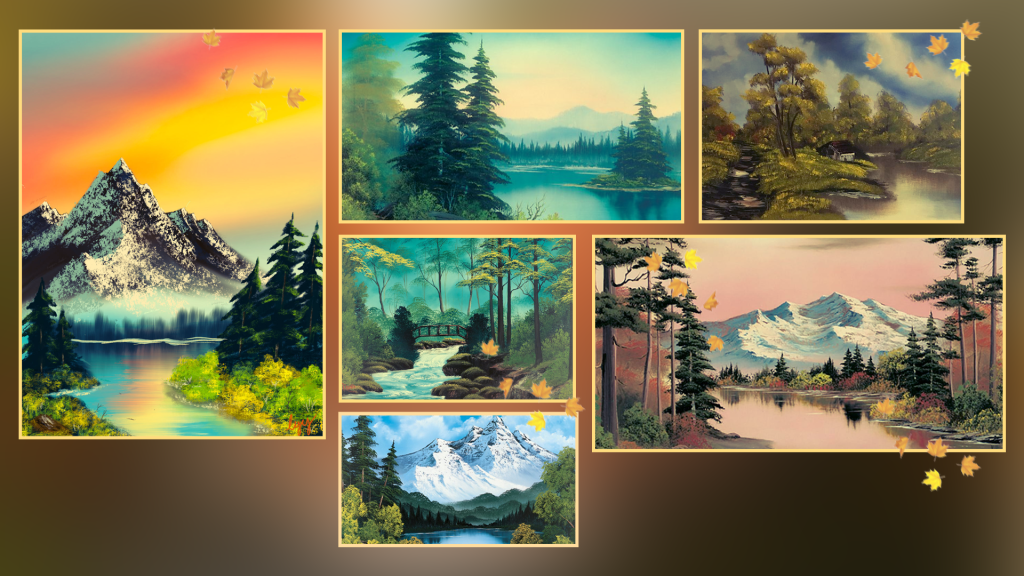
Because the intention was to have points in the space that overlooked vistas that were reminiscent of Bob Ross paintings, I needed some inspiration so I put together a mood board from a handful of his videos in order to assist with the environment design. I felt compelled to make the scene have an autumn feel since it’s one of my favorite seasons and I didn’t want to let go of that feeling as we started getting snow in Colorado.
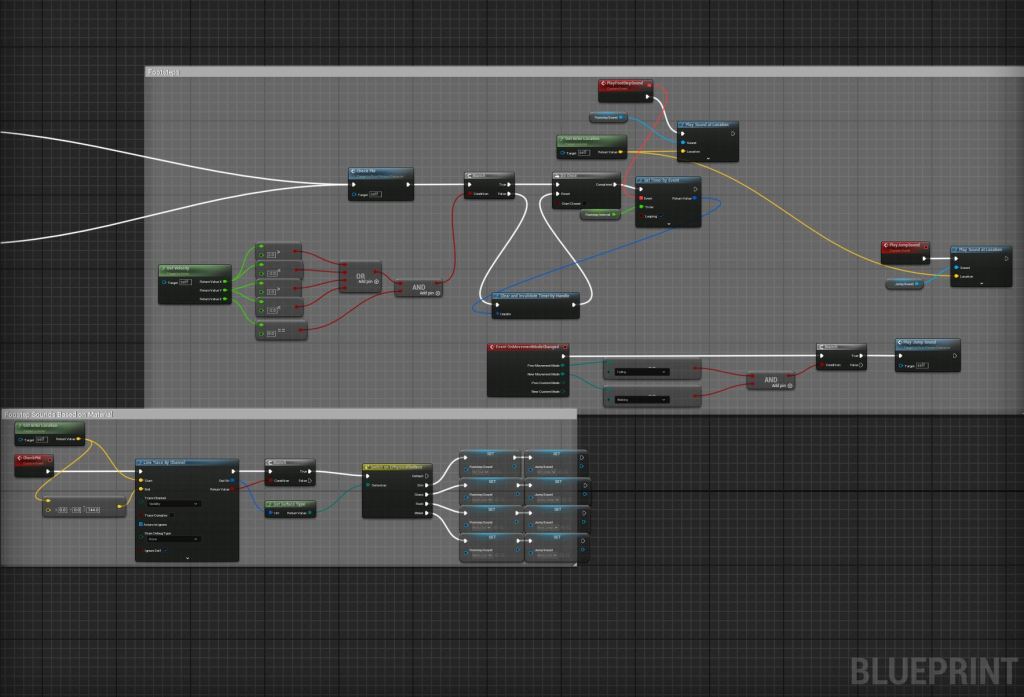
One of the biggest learning hurdles was around the blueprint system and how to have footstep sounds based off of the material that was currently being walked on. I referenced a couple of videos in order to learn how to create this effect, and this one was particularly helpful. I had a little bit of trouble, but understanding how ray-casting works from my time in Unity helped a lot. Below is a snapshot of the foot step sound blueprint.
The final thing that I worked on with the controller was the UI. Since the objective was to create an immersive experience, I knew I wanted to limit the amount of menus and interfaces to allow the user to jump straight in and explore the space, so I created a minimalistic pause menu that is enabled on launch, and as soon as you hit play you’re already in the space and ready to explore. Below is a video of me walking through the space, and also a download button if you’d like to check it out yourself.
– Retrospective –
I’m super happy with the outcome of this project, especially when I was able to present it during critique. I have always struggled with being my worst critic, but being able to see people’s reactions to walking around the space in real time felt so great. This project the 3D motion design class as a whole really helped with my self confidence in myself and my work. It also was another project that reinforced that I love making interactive media and working in game design.
I think that this project is another example of how quickly I can learn new skills. I was working simultaneously on Wristy, Outreach, and this all at the same time and managed to make something that I’m proud of in just just under a month.
One downside to this project was the fact that it wasn’t optimized at all, since I had recently built a powerful PC at the time it was able to run the game without any issues, but old PCs really suffered when trying to run it, I wish I had prioritized learning more about optimization as it would’ve made the final critique go even better.
When looking back there’s one thing that I wish I had done better though. I typically allow for some flexibility in development so that I can improvise, but my original pitch wasn’t anything like my final deliverable. The project was very open-ended from the start and was titled “choose your own adventure”. While that’s what I did, I wish I had planned for it from the beginning and put it in the design brief. Ultimately, I communicated the change to my professor and it was received well, but I wish I had planned better. I have a habit of not putting my ideas on paper and just letting myself run wild when making something, and while I love doing that, when completing my design minor, I really learned to appreciate planning and pre-production as a tool for myself.
 ALEX VERKEST